
Equipment panel
The Eleven Inventory Equipment panel on FiveM: drag illenium-appearance clothes on and off, drop them on the ground, shop purchases, gloves, uniforms and rules.
The Equipment panel sits next to the player's inventory and shows what they're wearing, one slot per garment. Every garment is a regular ox_inventory item: it can be taken off, stored in a trunk, handed over, sold or dropped like anything else.
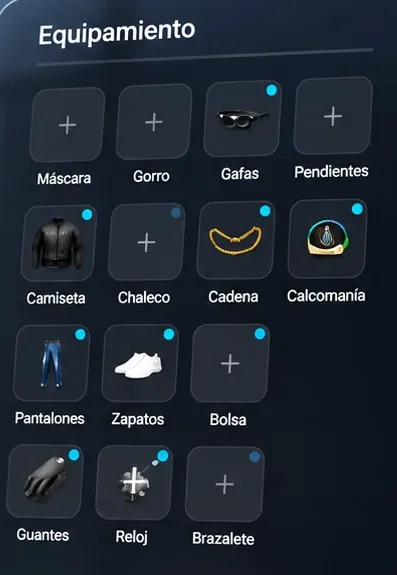
The slots
There are 14 slots by default, in rows of 4:
| Mask | Hat | Glasses | Earrings |
| Top | Vest | Chain | Decal |
| Pants | Shoes | Bag | |
| Gloves | Watch | Bracelet |
An empty slot shows its icon; a filled one shows the item image. You can change the slots, their order and the item names in Configuration.
Putting clothes on and taking them off
| You want to… | How |
|---|---|
| Put a garment on | Drag it from your inventory to its panel slot. Or Ctrl + click it in the grid when no other inventory is open. |
| Take a garment off | Drag it from the panel to a slot in your inventory. Or Ctrl + click the panel slot: it goes to the first free slot. |
| Leave it on the ground | Drag it from the panel out of the inventory, or onto the ground panel. |
| Swap one for another | Drag the new one onto the filled slot: the old one goes back to the same grid slot the new one came from (or any other if it doesn't fit). |
If there's no room in your inventory, you can't take it off and you get "You don't have room in your inventory for that."
When you drop a garment, it goes into the ground bag you have open, if any; otherwise a new bag is created at your feet. You can't drop clothes on the ground from inside a vehicle.
Tip
With animations on, the character mimes putting on or taking off the garment and the swap happens partway through the clip. In a vehicle, seated animations are used instead.
Weight and storage
- While you wear it, the garment leaves the grid and doesn't count toward weight. It's kept in the database, in the
precinto_wearablestable (one row per character). - When you take it off, it goes back to the grid as an item and weighs whatever its
items.luaentry says (by default, from 10 g for a decal to 1.5 kg for a vest). - Garments don't stack: each one carries its own model and texture in its metadata.
The saved skin is the source of truth
What counts is the character's saved appearance in illenium-appearance. If it changes outside the panel (in a clothing shop, from a saved outfit…), the panel catches up:
- New garments become items. Anything bought in a clothing shop shows up in the panel with no extra steps.
- Edited garments are updated with their new model and texture.
- Garments you no longer wear go back to the inventory if they were real items, or disappear with the previous outfit if they were only a copy of what you had on.
Existing characters get items for everything they're wearing the first time they open the inventory. Nobody has to hand out clothing items: they're always created from what the character is wearing.
Tops, gloves and sleeves
- The top brings what's underneath with it: taking it off also removes the undershirt, and putting it back on restores both.
- Gloves adapt to the sleeves of the top you're wearing, so you don't get cut-off arms. The full logic is only available on the freemode peds (
mp_m_freemode_01/mp_f_freemode_01). - Some gloves can't be worn without a top. Trying it shows "Those gloves can't be worn without a top." If you take your top off while wearing them, they go back to your inventory.
Job and gang uniforms
While an illenium-appearance uniform is on, clothing changes are saved into your civilian skin but not drawn over the uniform: you'll see them once it comes off. Toggle commands refuse with "You are wearing a work uniform: take it off before changing clothes."
If the message sticks around after the player has taken the uniform off, see illenium-appearance patch.
When you can't get changed
The server checks this on every change:
- Dead or in last stand: no changes. You get "You can't change clothes right now."
- Cuffed: no dragging in the panel, but toggle commands still work, without the animation.
Both rules, and the state bags your death and cuff scripts use, are set in Configuration.
Who wore it
With stampOwner = true, the first character to wear a garment is stamped on the item (metadata.owner, with their id and name). If that jacket ends up in someone else's hands, other resources can find out whose it was with the GetWearableOwner export. See Commands and exports.
If the resource is stopped
If precinto-inventory is stopped or doesn't respond, the Equipment panel simply doesn't show and the rest of the inventory works as normal.