
Installation
Install Eleven Mate on FiveM: mate, yerba_mate and termo items for ox_inventory, server.cfg with Qbox, QBCore or ESX, a /giveitem test, Keymaster and updates.
Requirements
| Resource | Used for |
|---|---|
ox_lib | Key prompts, progress circle and skill check |
ox_inventory | The mate, yerba_mate and termo items |
| Qbox, QBCore or ESX (optional) | Thirst and stress. It also runs without a framework, but won't change them |
Note
Tested on Qbox. Bridges for QBCore and ESX are included (Config.Framework) but haven't been tested on a live server yet. If something fails with your framework, open a ticket.
ox_inventory is required: the resource won't start without it. No database needed.
After purchase, the resource shows up in your Cfx.re Keymaster account as eleven-mate.
Tip
First time with an escrowed script? The general guide Install with Keymaster walks you through the download, your server license key and escrow step by step.
Step-by-step install
1. Copy the resource
Download eleven-mate from Keymaster and drop the folder into resources. Keep the folder name (if you change it, see the note in step 2).
2. Register the items
Open install/items.lua from the package and paste the three entries inside the table in ox_inventory/data/items.lua:
    ['mate'] = {
        label = 'Mate',
        description = 'Gourd and bombilla with yerba mate. Use it to hold it and take sips.',
        weight = 350,
        stack = false,
        close = true,
        consume = 0,
        image = 'mate.png',
        client = { export = 'eleven-mate.useMate' },
    },

    ['yerba_mate'] = {
        label = 'Yerba Mate',
        description = 'A pack of yerba. Use it to prepare the mate.',
        weight = 200,
        stack = true,
        close = true,
        consume = 0,
        image = 'yerba_mate.png',
        client = { export = 'eleven-mate.useYerba' },
    },

    ['termo'] = {
        label = 'Thermos',
        description = 'Thermos with a pouring spout. With the mate in hand it pours water; otherwise it is refilled with a bottle of water.',
        weight = 1000,
        stack = false,
        close = true,
        consume = 0,
        image = 'termo.png',
        client = { export = 'eleven-mate.useTermo' },
    },
Feel free to change label and description. Keep consume = 0: the script decides when each item is used up.
Note
Simple mode (Config.FullMode = false) only needs the mate item.
Important
The export lines use the folder name. If you rename the folder, replace eleven-mate. in all three with the new name. Otherwise, using the item prints No such export useMate in resource eleven-mate in the F8 console.
Water for the thermos. The thermos is refilled by using up a water item: the first one found from Config.Thermos.waterItems (water or water_bottle by default). At least one of them must exist in your ox_inventory/data/items.lua. If your water item has another name, put it there.
Where the items come from. The package adds no shops or vendors. Sell them in an ox_inventory shop (copy-ready example) or hand them out like any other item. More in the FAQ.
3. Copy the item images
Copy install/images/*.png (mate.png, yerba_mate.png, termo.png) to ox_inventory/web/images/.
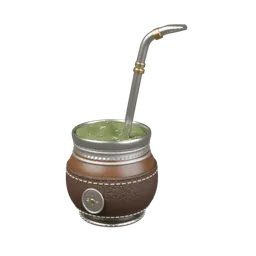 | 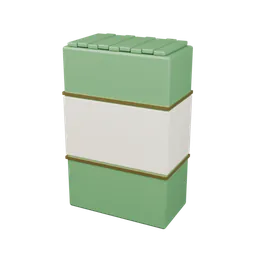 | 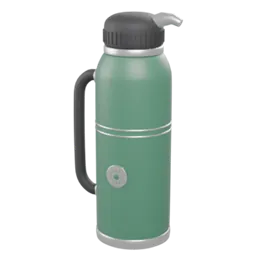 |
|---|---|---|
mate.png | yerba_mate.png | termo.png |
4. Add it to server.cfg
After ox_lib, ox_inventory and your framework:
ensure ox_lib
ensure qbx_core        # your framework (or qb-core / es_extended). Optional: without it, no thirst or stress
ensure ox_inventory
ensure eleven-mate
5. Set up the config
Open config.lua and pick at least the language, framework and notifications:
Config.Locale    = 'en'      -- 'en' or 'es'
Config.Framework = 'auto'    -- 'auto', 'qbox', 'qbcore', 'esx' or 'none'
Config.Notify    = 'ox_lib'  -- 'ox_lib', 'qbcore' or 'esx'
Every other option is covered in Configuration.
6. Restart the whole server
Warning
Don't restart this resource while players are connected. It streams custom models (stream/). Restarting it live (restart/ensure, txAdmin, or copying files over stream/ while the server runs) can crash clients or leave them stuck loading. Install and update with a full server restart.
7. Test it
Join with a character that has admin rights (group.admin) and give yourself the items with the ox_inventory command. The syntax is /giveitem <player id> <item> [count]; it may differ with your ox_inventory version or if you use your framework's own command.
/giveitem 1 mate 1
/giveitem 1 termo 1
/giveitem 1 yerba_mate 2
/giveitem 1 water 2
Replace 1 with your player id. Then, in full mode:
- Use the
matefrom your inventory. It appears in your hand with the prompt[E] Sip · [R] Pour water · [G] Put the mate away. - A new mate comes with yerba but no water. Press R to pour from the thermos (a new thermos comes full).
- Press E to take a sip. Thirst should go up and stress down, and the mate's durability drops in the inventory.
- Try the yerba: when the yerba is spent (
The yerba is spent. Prepare the mate with fresh yerba.), useyerba_mate. The skill check appears with the close-up camera. - Try the thermos: put the mate away (G) and use the
termowith water in your inventory. If the thermos isn't full, it refills and uses onewater.
In simple mode, step 1 and E are enough: the mate disappears when it's finished.
Nothing happens when you use the item? See Troubleshooting.
Keymaster entitlement error
If the console shows something like You lack the required entitlement to use eleven-mate on startup, the server isn't allowed to run the encrypted resource:
- The server's license key (
sv_licenseKey) must belong to the same Cfx.re account you bought the script with. - Download the resource from Keymaster with that account; don't copy it from another server.
- After changing the key, restart the whole server.
Every case is covered in the general guide Install with Keymaster.
Still failing? Open a ticket on our Discord.
Updating
- Download the new version from Keymaster.
- Back up your
config.luaand your translations (locales/). - Stop the server, replace the
eleven-matefolder and put your config and translations back. If the new version adds keys toconfig.lua, copy them into yours. - Start the server. Never update while it's running: the resource streams models.