
Building the catalog
How your staff builds the Eleven Outfits catalog in game: get dressed, press New outfit, let the photo take itself, retake it or remove an outfit.
Who can do it
Creating outfits, retaking photos and removing outfits is reserved for the staff in Config.Staff: having one of its ACEs (group.admin by default) or one of its framework groups (admin or god by default) is enough. See Commands and permissions.
The catalog starts empty. As staff you will see "There are no outfits yet" and the New outfit button at the top.
Creating an outfit
- Go to a clothing shop and put on the outfit you want to add (with the illenium-appearance editor, like any player). Use a male or female MP character: the outfit is saved for that gender and only players of that gender will see it.
- Open the shop menu → Outfit catalog → New outfit.
- Give it a name (2 to 40 characters) and pick a style.
- Press Save and take photo. Don't move: the camera places itself, takes a full-body photo and uploads it.
- A message confirms the outfit is now in the catalog and the card shows up with its photo.
Important
It saves the clothes you entered the catalog with, not whatever you are trying on at that moment. To start from a catalog outfit, buy it or put it on in the editor, close the catalog and open it again.
If the photo fails, the outfit is saved anyway and you get "Saved, but without a photo: …" with the reason. The card stays on "No photo" and you can retake it later.
Retaking the photo or removing
On every card, staff see two buttons at the top right:
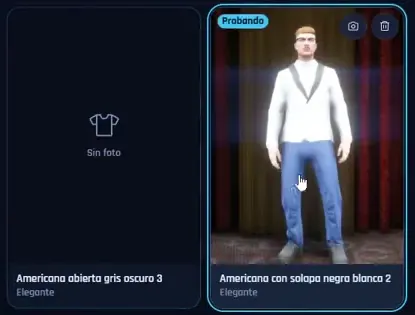
| Button | What it does |
|---|---|
| Camera (Retake photo) | Puts the outfit on you and takes a new photo with the same framing. Useful if the first one went wrong or you changed the framing. |
| Bin (Remove from catalog) | Asks for confirmation and hides it. Players who already bought it keep it in their outfits. |
Removing does not delete the database row: it marks it inactive (active = 0 in outfit_catalog).
To retake many photos at once (for example after changing the framing or the photo spot) use /outfitphotos all from the photo studio.
Tips for a good catalog
- Consistent photos: take every photo at the same spot. That is what
/outfitphotosis for: it takes your character to the studio photo spot. - Look at your clothes before combining:
/clothesphotosphotographs every garment on your server into thestudio/folder so you can choose without trying them one by one. - Clear names: the search box searches by name. "Beige checked blazer" is easier to find than "Outfit 12".
- Styles: the seven default ones are changed in
Config.Styles. Do not rename the id of a style that outfits already use: it is stored in the database.
Warning
Outfits are stored as drawable and texture numbers, like everything in illenium-appearance. If you add, remove or reorder clothing packs, outfits shift the same way a saved appearance would. Remove and recreate the affected ones.