
Installation
Install Patrolink on FiveM step by step: ox_inventory items, server.cfg with OneSync and framework, language, police and EMS jobs, watchdog and Keymaster error.
1. Download
Download Patrolink from Keymaster with the same Cfx.re account you bought it with. If this is your first time using Keymaster, follow the Install with Keymaster guide first. The zip contains the eleven_radio folder.
2. Copy the folder
Copy eleven_radio into resources/ (or into whichever subfolder you use, such as resources/[voice]/).
Important
Don't rename the folder and don't add dashes to it. pma-voice cleans up channel checks using the resource name as a pattern, and a - breaks that cleanup.
3. Remove qbx_radio
If you run qbx_radio, take it out of resources/ (or comment out its ensure). Patrolink already answers its exports and events. The details, and what to do with your scripts, are in Replace qbx_radio.
4. Add the items to ox_inventory
Open ox_inventory/data/items.lua and paste the items from eleven_radio/install/items.lua:
['radio'] = {
    label = 'Patrolink PL-3',
    weight = 600,
    stack = false,          -- every radio carries its own serial number
    allowArmed = true,
    description = 'Civilian handheld radio. Free dial from 1 to 500.',
    client = { image = 'patrolink_pl3.png' },
},

['radio_pl7'] = {
    label = 'Patrolink PL-3T',
    weight = 800,
    stack = false,
    allowArmed = true,
    description = 'Service handheld: 4 zones of 16 channels, private calls, 10-codes and emergency button.',
    client = { image = 'patrolink_pl7.png' },
},

-- Optional (Config.Encryption.enabled). Uses are stored in the item metadata.
['radio_decryptor'] = {
    label = 'Radio decryptor',
    weight = 900,
    stack = false,
    close = true,
    description = 'Plugs into a Patrolink radio to listen to an encrypted channel for a while. Cannot transmit.',
},
- Qbox and QBCore already ship a
radioitem: replace it with the one above, don't add a second one.stack = falseis required: each radio has its own serial number and tuning. - Item names must match
Config.Models(config/config.lua) andConfig.Encryption.item(config/encryption.lua).
5. Copy the images
Copy eleven_radio/install/images/*.png to ox_inventory/web/images/.
PL-3 (patrolink_pl3.png) | PL-3T (patrolink_pl7.png) |
|---|---|
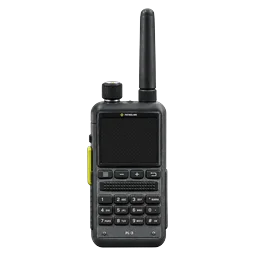 | 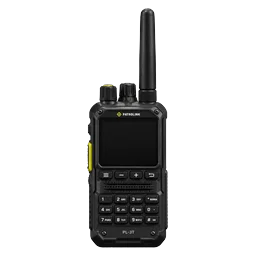 |
The decryptor has no image: use any icon you like.
6. Add it to server.cfg
Patrolink needs OneSync, and your framework must start before it:
set onesync on            # or turn it on in txAdmin's settings

ensure ox_lib
ensure oxmysql
ensure qbx_core           # or qb-core, or es_extended: whichever you use
ensure ox_inventory
ensure pma-voice

ensure eleven_radio
- OneSync. The resource lists it as a dependency (
/onesync): without it, it won't start. If you run the server with txAdmin, turn it on in its settings instead of inserver.cfg. - Framework. Patrolink looks for
qbx_core,qb-coreores_extendedalready started. Ifeleven_radiostarts first, the F8 console shows[eleven_radio] No framework detected. Start eleven_radio after qbx_core / qb-core / es_extended.and the server console[eleven_radio] No framework found to register item radio. Fix the order or setConfig.Framework('qbox','qbcore'or'esx') inconfig/config.lua.
The database tables (patrolink_numeros, patrolink_bloqueos and patrolink_canales) are created automatically on first start. There's no SQL to import.
7. Pick the language
In config/config.lua:
Config.Locale = 'en' -- 'en' (default) or 'es'
Any file in locales/ works. If your file is missing a key, the English one is used. If you set a language that doesn't exist, the console warns with locales/xx.json not found, using English.
8. Match your jobs
Out of the box, the restricted channels (1 to 10) and the service features are for the police and ambulance jobs. If your server uses other names (lspd, bcso, sheriff, ems…), your officers will see NO ACCESS on those channels until you change them. They live in three places:
| File | Key | What for |
|---|---|---|
config/config.lua | Config.RestrictedChannels | Who can join the restricted channels (and, with them, the encrypted ones). |
config/config.lua | Config.ServiceJobs | Who gets the emergency button, 10-codes and a unit for private calls. |
config/security.lua | lockJobs and logJobs | Who can lock stolen radios and who can read the transmission log. |
Example with LSPD, BCSO and EMS:
-- config/config.lua
Config.RestrictedChannels = {}
for channel = 1, 10 do
    Config.RestrictedChannels[channel] = { lspd = true, bcso = true, ambulance = true }
end

Config.ServiceJobs = {
    lspd = { control = 'LSPD' },
    bcso = { control = 'BCSO' },
    ambulance = { control = 'EMS' },
}
More examples (separate channels per department, firefighters, mechanics) in Channels and frequencies.
9. Before you open the server
Check whether any of your other scripts put players on pma-voice channels from 1 to 500 (job radios, phone calls, dispatch consoles…). The server watchdog removes anyone without a Patrolink turned on from that range, so those players would be kicked off the channel every few seconds. You have two ways out:
- Move those scripts to channels above 500 (
Config.Dial.maxFrequency). - Or return
truefor those players inConfig.Hooks.WatchdogExempt, inconfig/hooks.lua.
10. Optional: with Eleven Police MDT
If you own Eleven Police MDT, copy its extras/eleven_radio/hooks.lua over Patrolink's config/hooks.lua and match the jobs. The steps are in Integration.
11. Try it
- Give yourself a radio:
/giveitem <id> radio 1(or your framework's command). - Use it from the inventory: it shows up on screen.
- Click the volume knob to turn it on, dial
90and press#.
Carry on with Using the radio.
"You lack the required entitlement to use eleven_radio"
If the console shows You lack the required entitlement to use eleven_radio, the server can't verify that you own the resource:
- The server key (
sv_licenseKey) must belong to the same Cfx.re account you bought Patrolink with. - Download the resource from Keymaster with that account. A zip downloaded with another account won't work.
- Restart the whole server after changing the key (
ensureis not enough).
More detail in the Install with Keymaster guide. If it still fails, open a ticket on our Discord.
Next steps
- Using the radio and Channels and frequencies.
- Troubleshooting, if something doesn't work.
- Updating and the general Update a script guide, for when a new version comes out.