
Usage and editor
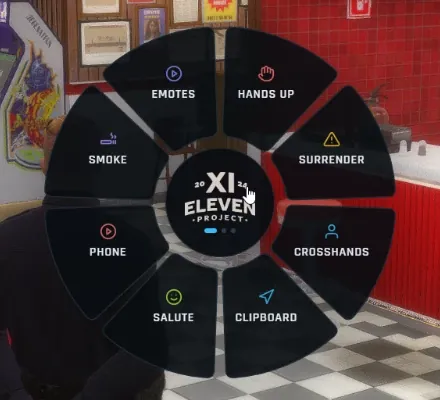
How players use Eleven Radial in game: hold and release the wheel, switch pages with the mouse wheel, and edit each slice's name, command, icon and colour.
Using the wheel
- Hold TAB (or whatever key the player has bound). The wheel appears and the cursor goes back to where you left it last time.
- Aim at a slice. Only the angle matters, not the distance: you don't need to hover right over it.
- Release TAB and that slice's command runs.
Release with the cursor in the centre of the wheel and it closes without doing anything.
Switching pages
With the wheel open, scroll the mouse wheel. Each flick moves one page; the dots under the centre logo show where you are. The server sets the number of pages (Config.Pages, 1 to 5).
What's blocked while it's open
You can keep walking (WASD). While the wheel or the editor is open, the camera, shooting and aiming, melee, entering and leaving vehicles, jumping and crouching are blocked, so nothing fires by accident.
Editing your wheel
With the wheel open, press SPACE (the Config.EditorControl key). The editor opens with every page in view.
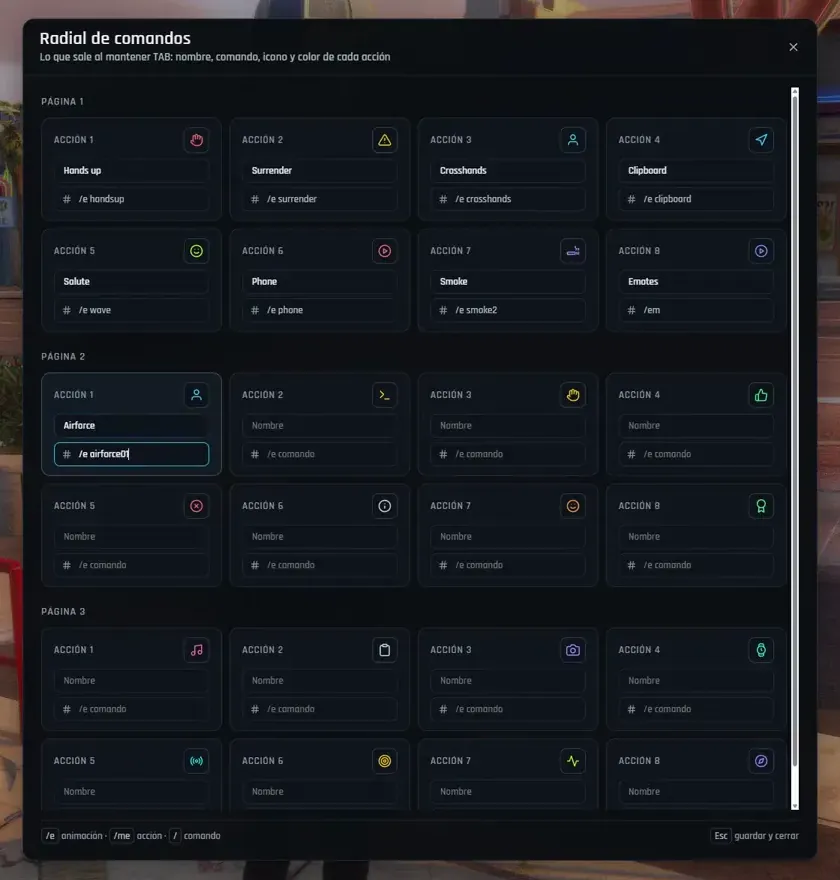
Each card is one action, in the same order as on the wheel:
| Field | What goes in | Limit |
|---|---|---|
| Name | The text shown on the slice | 24 characters |
| Command | What runs on release | 120 characters |
| Icon button | Opens the icon and colour picker | — |
Commands
Type the command as you would in chat, with the slash: /e wave, /me scratches his head, /lock. The editor footer reminds you: /e emote, /me roleplay action, / any command. To leave a slice empty, clear its name and command.
Icon and colour
Click a card's icon button:
- Colour: pick one of 12. The picker stays open so you can try a few.
- Icon: pick one of 67, grouped by theme, or search by name. Enter in the search box picks the first match.
- Auto: removes the chosen icon and goes back to the automatic one, which follows the command (
/e→ emote,/meor/do→ roleplay, any other/→ command).
The full list of icons and colours is in Configuration.
Saving
Press Esc or the X at the top: it saves and closes. If the icon picker is open, the first Esc only closes the picker. Enter inside a field finishes editing it.
Your wheel is saved on the server, on your character: it's the same next time you join, or from another PC. Each character has its own.
Note
The server checks everything you save: it trims long texts, drops icons or colours that don't exist and accepts one save per second. When you close the editor, the wheel shows exactly what was saved.
When you can't edit
- If the server has
Config.AllowEditing = false: everyone uses the same wheel and SPACE does nothing. - While another script is showing you a context wheel (for example, the actions inside a house). Once that situation ends you're back on your own wheel and can edit it.
Changing the key
Each player can pick a different key in Settings → Key Bindings → FiveM, under "Open radial wheel". It only affects them.