
Using the radio
How players use Patrolink on FiveM: power, tuning with the keypad, on-screen menu, favorites, alias, HUD, mouse and channel keys on the PL-3 and PL-3T radios.
Taking out and putting away the radio
- Use the item (
radioorradio_pl7) from the inventory or hotbar: the radio shows up on screen and the character holds it. - Use it again to put it away. It stays on: you still hear and talk, and the HUD shows who's speaking.
- If you carry both radios, the last one you used is the active one.
Tuning, zone, volume and backlight are stored on the item itself. Give your radio to another player and they get it exactly as you left it.
Mouse and movement
With the radio open, the mouse belongs to the radio and the character keeps walking and driving.
| Action | How |
|---|---|
| Release or take back the mouse | A short tap of Left Alt. The radio stays on screen. |
| Talk | Hold your pma-voice radio key (Left Alt by default too) or hold the PTT button on the image. You can also bind «Radio: push to talk (Patrolink)», which works with the radio open or put away. |
| Press keys and knobs | Click them on the image. Hover a control to see what it does. |
Holding Alt to talk doesn't toggle the mouse: only a short tap does. That tap may play a short mic click on the channel; if you prefer another key, change it in Config.Mouse (config/hud.lua).
Power and volume
- Click the volume knob: turns the radio on or off.
- Mouse wheel over the knob: volume up or down (1–10).
- When turned on, the radio goes back to the last frequency it had.
PL-3 (civilian)
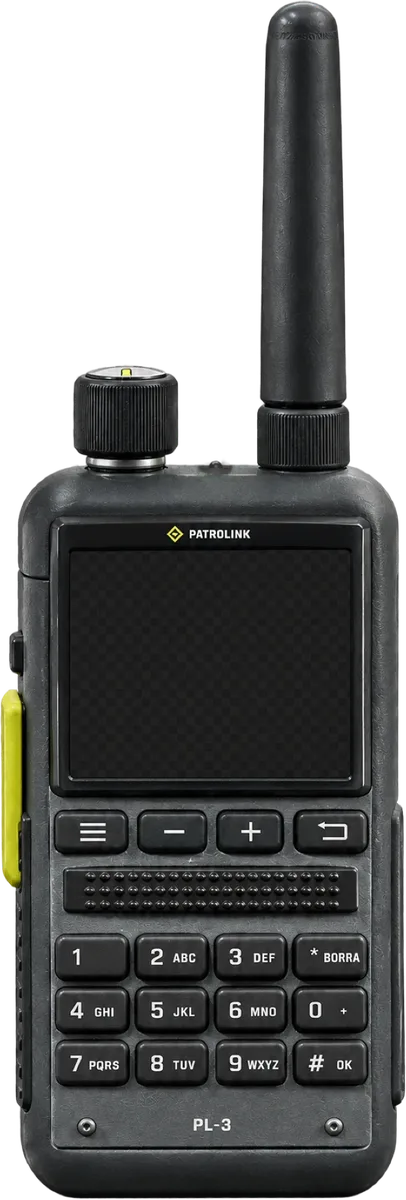
| Control | What it does |
|---|---|
| Knob | Power and volume. |
Keypad 0–9 | Dial the frequency. |
# (OK) | Tune what you dialled. |
* (clear) | Clear what you dialled. |
− / + | Previous or next frequency (steps of 1, skipping channels you can't join). |
Menu ≡ | Opens the on-screen menu. |
Back ↩ | Clears what you dialled or returns to the main screen. |
| Side button | Turns mic clicks on or off. |
| PTT (yellow side key) | Hold to talk. |
Dialling a frequency
Type up to 5 digits and press #:
| You dial | You tune |
|---|---|
90 | 90.00 |
155 | 155.00 |
1050 | 10.50 |
15025 | 150.25 |
With 1 to 3 digits it's a whole frequency; with 4 or 5, the last two digits are the decimals.
PL-3T (service)
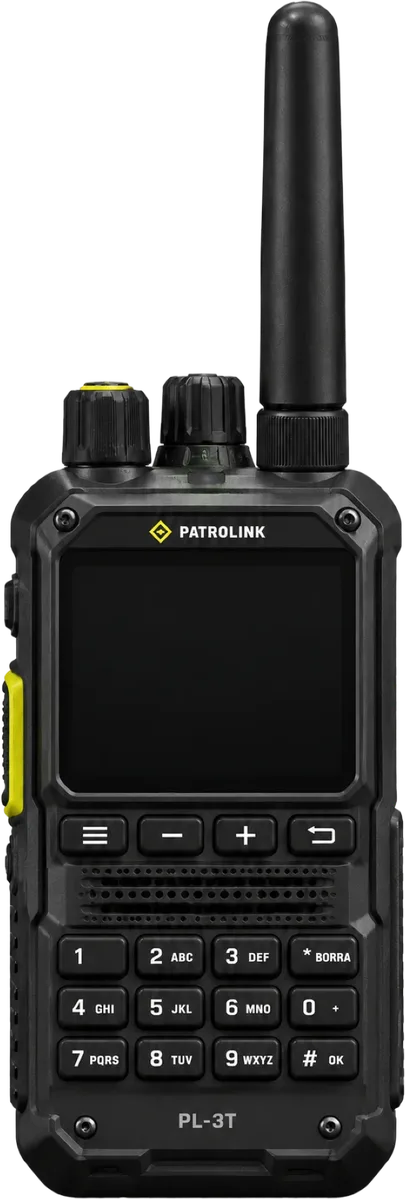
| Control | What it does |
|---|---|
| Left knob | Power and volume. |
| Yellow cap on the left knob | Emergency (see Service features). |
| Right knob | Channel selector: wheel or click to go forward, Shift + click to go back. |
| Top side button | Switches zone (4 zones of 16 channels). |
Keypad + # | Dial the channel position (1–16) and tune it. |
− / + | Previous or next channel in the zone. |
Menu ≡ | Opens the on-screen menu. |
Back ↩ | Clears, hangs up a call or returns to the main screen. |
| PTT (yellow side key) | Hold to talk. |
How zones and channels are laid out: Channels and frequencies.
On-screen menu
Press Menu to open it. You drive it with the radio's own keys:
| Key | In the menu |
|---|---|
− / + (or 2 / 8) | Move through the list |
# | Select or tune |
* | Add or remove a channel from favorites |
4 / 6 | Switch zone (in "Zone channels") |
| Back | Go back |
| Menu | Close |
| Option | PL-3 | PL-3T | What it does |
|---|---|---|---|
| Favourites | Yes | Yes | Your marked channels (up to 12) with how many people are on each. |
| Recent | Yes | Yes | The last 5 channels you joined. |
| Zone channels | — | Yes | The 16 channels of the zone with their names. |
| Private call | — | Yes | Call another unit by its code. |
| 10-code to dispatch | — | Yes | Send a 10-code. |
| Radio alias | Yes | Yes | The name others see when you talk. |
| Settings | Yes | Yes | Mic clicks and screen backlight. |
Favorites and recents are saved per character and per radio model.
Alias
The alias is the name shown on other players' HUD when you talk (if you have no service callsign). You type it on the keypad like an old phone: press the same key repeatedly to cycle letters. # saves, * clears.
- 2 to 14 characters: letters, numbers, spaces and
. _ '. - It can't start with a number.
- It can't contain words reserved for services (
LSPD,EMS,POLICE,DISPATCH…) or look like a callsign (ADAM 12,LINCOLN-4…).
The alias is stored on the item, so it travels with the radio.
Screen
| Status | Meaning |
|---|---|
| CONNECTED | You're on the channel. |
| CONNECTING… | Waiting for pma-voice to confirm the channel. |
| NO CHANNEL | Nothing tuned. Dial a frequency. |
| NO ACCESS | Restricted channel: you need the job and to be on duty. |
| IN PRIVATE CALL | A PL-3T call is active. |
| SERVICE | Another service radio holds your pma-voice channel (see Integration). |
| RADIO LOCKED / CUFFED / UNCONSCIOUS / HANDS UP | The radio can't transmit or receive right now. See Security. |
HUD
While the radio is on, a small HUD in one corner shows the frequency, the status and who's talking (up to 3 names at once; the rest show as "+N"). It's visible with the radio put away too.
Each player moves it to another corner with /radiohud, hides it with /radiohud off and brings it back with /radiohud on.
Keys without opening the radio
| Action | Default key |
|---|---|
| Next channel | ] |
| Previous channel | [ |
| Next favourite | Unbound |
| Previous favourite | Unbound |
| Last channel (toggle) | Unbound |
| Talk on the dial | Unbound |
Each player can rebind them in Settings → Key Bindings → FiveM. Full list in Commands and keys.